
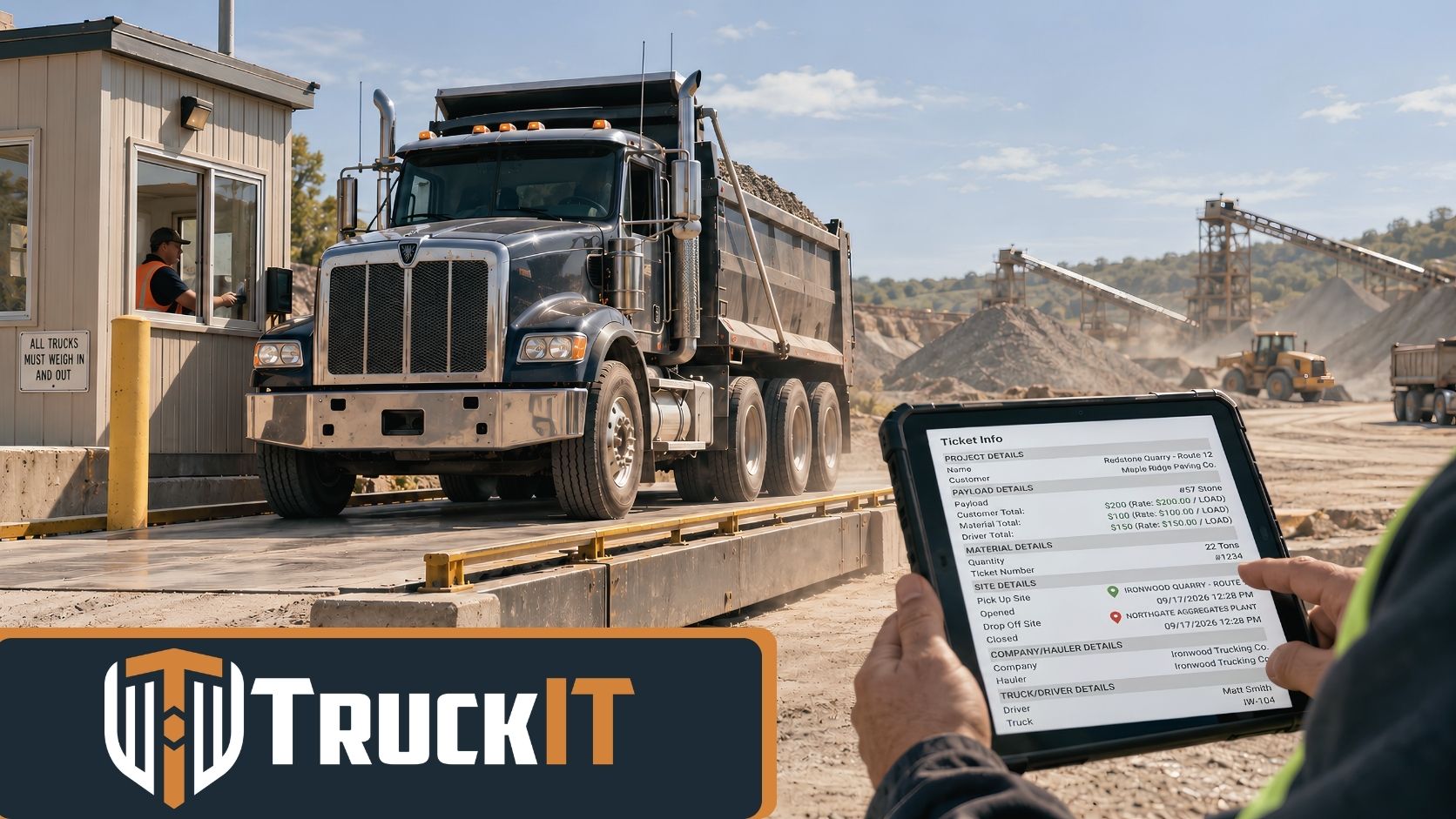
E-ticketing is the digital management of hauling and material tickets used across construction and heavy hauling. Depending on the operation, that can mean digitizing an existing paper ticket or using a fully paperless process where ticket data comes directly from the scalehouse.
Both approaches help connect important information like the truck, driver, material, quantity, pickup, delivery, timestamps, and proof of delivery.
For contractors, haulers, and material producers, a hauling ticket is much more than a receipt.
It proves what was loaded, who hauled it, where it went, and what should be billed or paid.
The trouble starts when all that important information is riding around in a truck cab on a piece of paper.
As hauling volume grows, paper tickets can create delays across dispatch, reconciliation, and billing. E-ticketing gives construction teams a faster, cleaner way to move that information from the scalehouse to the field and back office.
What Is E-Ticketing in Construction Hauling?
E-ticketing is the digital capture, management, and sharing of hauling ticket information.
An e-ticket record may include:
- Ticket number
- Truck and driver
- Material type
- Weight or quantity
- Pickup and delivery locations
- Project or customer
- Electronic signature
In practice, e-ticketing can take two forms.
Digitized ticket capture starts with a paper ticket. The driver photographs or scans it, and the ticket information is converted into a digital record.
Paperless e-ticketing removes the paper ticket from the process. Ticket information is transmitted electronically from the scalehouse and moves through the workflow digitally.
Both approaches reduce manual paperwork. The difference is whether paper is still part of the process when the ticket is created.
Modern e-ticketing and digital ticket workflows can bring ticket capture, delivery verification, reconciliation, and reporting into the same process.
Why Do Paper Tickets Cause So Much Extra Work?
Paper tickets are familiar. They are also easy to lose, damage, misread, or leave sitting in a truck.
When a ticket goes missing, the office may have to figure out which driver had it, which plant issued it, and which load it belonged to.
Then somebody still has to enter the information into another system.
Ticket numbers, tonnage, materials, job numbers, and truck information can all be entered incorrectly. Handwritten tickets make the job even harder.
And until the paperwork reaches the office, billing may have to wait.
That is why a missing ticket can create problems long after the truck has finished the load.
The more trucks, plants, leased haulers, and jobs an operation manages, the more those small delays can pile up.
How Does E-Ticketing Work?
A good e-ticketing process follows the load through the job instead of treating the ticket as a separate piece of paperwork.
1. The Job Is Dispatched Digitally
Dispatchers assign trucks, pickup locations, delivery locations, materials, start times, and job instructions.
Drivers can get that information through a mobile device instead of relying on separate texts, phone calls, spreadsheets, or paper dispatch sheets.
When something changes, the updated information stays connected to the job.
That gives the driver, dispatcher, and office a better chance of working from the same information instead of piecing the day together later.
2. The Ticket Is Captured or Created Electronically
There are two common e-ticketing workflows.
Digitize an existing paper ticket. If the supplier still issues paper, the driver can capture the ticket digitally. The ticket information can then move to the office without waiting for the original piece of paper.
This lets contractors and haulers adopt e-ticketing even when some suppliers still rely on traditional tickets.
Use paperless e-ticketing at the scalehouse. In a fully paperless workflow, ticket data is transmitted electronically when the truck is loaded and weighed.
TruckIT's AirTicket™ e-ticketing technology is designed to transmit scalehouse ticket data and connect it with the corresponding truck and load.
That removes the need for the driver to handle a physical ticket at all.
3. The Load Stays Visible
An e-ticket becomes more useful when it stays connected to the truck through delivery.
Depending on the workflow, teams can monitor:
- Pickup status
- Truck location
- ETA
- Delivery status
- Cycle time
- Completed loads
- Job progress
Instead of calling drivers for constant updates, dispatchers can see how the day is moving.
That visibility is especially useful on asphalt, aggregate, and other high-volume jobs where truck timing affects production. Connecting ticket data with fleet and project performance information gives teams a clearer picture of what is moving, what has been delivered, and where delays may be developing.
4. Delivery Is Verified Digitally
Getting the load to the site is only part of the job. Teams also need proof that the right material reached the right place.
Digital proof of delivery can connect the e-ticket with the truck, material, quantity, delivery location, date, time, and electronic signature.
If a question comes up later, the parties involved can review the same delivery record instead of searching through piles of paperwork.
That creates a cleaner chain of custody from the scalehouse to the jobsite.
5. E-Tickets Are Reconciled in the Office
This is where e-ticketing can save a lot of administrative work.
Traditional reconciliation may require comparing driver tickets against dispatch records, supplier information, subcontractor invoices, spreadsheets, and accounting records.
With digital records, teams can organize ticket information by job, date, hauler, driver, truck, material, or quantity.
Once the information is verified, it can support billing, subcontractor payments, reporting, and job-cost analysis.
The work still has to be checked. The difference is that the office is working with organized digital information instead of sorting through stacks of paper first.
Paper Tickets vs. Digitized Tickets vs. Paperless E-Tickets
These workflows all record the same basic hauling transaction, but they do not begin the same way.
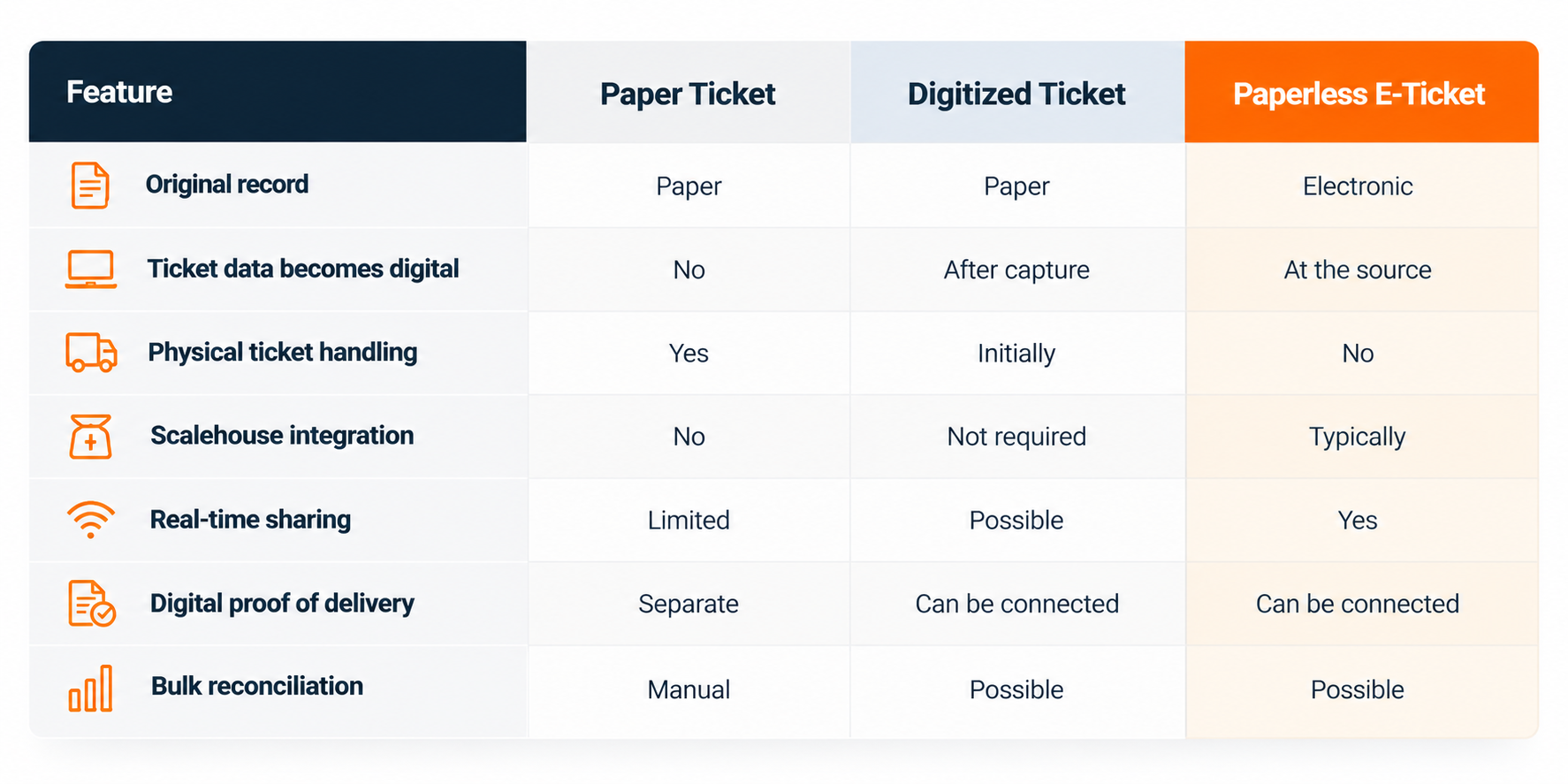
Both digitized tickets and paperless e-tickets can be part of a broader e-ticketing strategy.
The key difference is whether paper is still part of the process at the point of ticket creation.
Can You Use E-Ticketing if Some Suppliers Still Use Paper?
Yes.
In fact, many operations use both workflows.
A driver may receive a paperless e-ticket from one plant and a paper ticket from another. The paper ticket can still be digitized and brought into the same ticket-management process.
That gives contractors and haulers a practical path forward without requiring every supplier, customer, and subcontractor to change at once.
A good first step is to digitize the paper you already have.
As more suppliers support paperless e-ticketing, those connections can be added over time.
The goal is not to force every partner into the same system overnight. The goal is to create one reliable digital record of the work.
That kind of approach has already been used on major construction work. In one TruckIT contractor example, Dragados-Pulice used e-ticketing, dispatching, and material management together to reduce the burden of paper-based processes on a highway project.
What Are the Benefits of E-Ticketing?
The biggest benefit is not getting rid of the printer.
It is reducing the work that comes with paper.
A better e-ticketing workflow can mean:
- Fewer lost tickets
- Less manual data entry
- Faster reconciliation
- Better visibility into loads and deliveries
- Cleaner proof of delivery
- Fewer billing disputes
- Faster invoicing
- Better coordination between field and office
TruckIT reports a 78% reduction in time spent managing tickets, 10 minutes saved per driver per load, and a 98% decrease in unbilled tickets with its digital ticketing solutions.
The exact results will depend on the operation. But the basic math is easy to understand: every hour not spent collecting, typing, sorting, and chasing tickets can be spent on higher-value work.
For example, N.W. White used e-ticketing alongside dispatch and driver tools to improve visibility, reduce back-office work, and get ticket information into the billing process faster.
What Should You Look for in an E-Ticketing System?
Do not judge an e-ticketing system only by whether it can put a ticket on a screen.
Look at what happens before and after the ticket is created.
A useful system should help connect:
Dispatch. Jobs, trucks, drivers, locations, and materials.
Drivers. Simple mobile workflows that do not create more work behind the wheel.
Paper-ticket digitization. A practical way to handle printed or handwritten tickets from suppliers that still use paper.
Paperless e-ticketing. Direct connections with scalehouses where available.
Proof of delivery. A clear record that the load reached the correct destination.
Truck visibility. Status, location, ETA, and job progress.
Reconciliation. The ability to review and reconcile tickets in bulk.
Reporting. Filters for job, driver, truck, hauler, material, quantity, and date.
Integrations. Connections with accounting, ERP, telematics, scales, and other business systems.
The goal should be one connected workflow — not another software system that creates a new place to enter the same information.
Frequently Asked Questions About E-Ticketing
What is e-ticketing in construction?
E-ticketing is the digital capture, management, and sharing of hauling ticket information. It can include both paper tickets that are digitized after pickup and paperless e-tickets transmitted directly from a scalehouse.
Is digitizing a paper ticket considered e-ticketing?
It can be part of an e-ticketing workflow. The main difference is that a digitized ticket begins on paper, while a paperless e-ticket is created and transmitted electronically.
What is a paperless e-ticket?
A paperless e-ticket is created and transmitted electronically without requiring a physical ticket. In hauling operations, that often means ticket data moves directly from the scalehouse into the digital workflow.
Can handwritten hauling tickets be digitized?
Yes. Ticket-capture technology can turn information from printed or handwritten tickets into digital records, allowing companies to use e-ticketing workflows even when a supplier still issues paper.
Tools such as TruckIT's Automatic-PIC ticket capture are designed to pull information from printed and handwritten tickets without requiring the driver or office to enter every field manually.
How does paperless e-ticketing work at a scalehouse?
In a paperless e-ticketing workflow, the truck is identified and weighed at the scale. The corresponding ticket information is transmitted electronically and matched with the truck and load, making it available to approved users without relying on a physical ticket.
How can e-ticketing speed up billing?
The office gets faster access to verified ticket records instead of waiting for paper to come back from the field.
That can reduce data entry, missing-ticket research, and reconciliation work before an invoice is created.
Can contractors and haulers share e-ticket information?
With the right permissions, yes.
A connected e-ticketing system can make the same delivery information available to approved contractors, haulers, producers, field teams, and other project stakeholders instead of forcing each company to build its own record from paper.
Better E-Ticketing Means Better Information
A hauling ticket touches almost every part of the material supply chain.
The scalehouse creates the information. The driver moves the load. The field verifies delivery. Dispatch tracks progress. The office uses the record for billing or payment.
When that information stays on paper, every handoff creates more work.
E-ticketing keeps the record connected from dispatch and pickup through delivery, reconciliation, and billing.
Whether the process starts with a digitized paper ticket or a paperless e-ticket, the objective is the same: fewer manual handoffs, better visibility, and a more reliable record of the work.
TruckIT connects digital dispatching, driver workflows, ticket digitization, paperless e-ticketing, proof of delivery, reconciliation, reporting, and business-system integrations for heavy construction material hauling.
Ready to see how e-ticketing works in the field? See TruckIT in action.
Author:
Dan Hall
curious to see what's
Under the hood?
Request a demo below... let us answer your questions and show you how TruckIT can support your team and drive performance.